Application’s Architecture
There are 3 main components of the backend.
- 1
The RestAPI
- 2
The RTMP service
- 3
The worker service
The RestAPI
The RestAPI is written in NestJS (TypeScript). The reason why I went with this framework is cause I had not worked with any other nodejs backend frameworks expect expressjs. So, I wanted to get my hands dirty with nodejs and TypeScript. For database I have used Postgresql as for ORM I have used prisma.
The RTMP service
This is the heart of the application. The entire point of this application’s existence comes to this one service. Whenever a streamer starts the stream the stream is sent to this service. Then it gives the stream to FFMPEG which converts the RTMP stream to HLS video formats. The stream is transcoded to multiple bitrate (low, high, mid). This ensures adaptive bitrate.
Note
If you don’t have a PC with good specs, then it’s a bad idea to run this project for a long time. This only implies if you are using the streaming feature, since video transcoding takes a lot of cup/gpu power it’s not a good idea to run the steam for longer period of time.
The Worker service
This service is responsible for resizing user profile pictures. I know that this is a little bit over kill and there are 100s of library that can process images at once and send the response back but the sole reason why I implemented it this way is cause to increase my familiarity with microservice architecture.
For RPC communication I have used RabbitMQ. When an user uploads his/her image trough the RestAPI, the image is saved to the file system. Along with this a new file name is generated which at first gets saved to the database and then is sent to the message broker. Then the message is consumed by the consumer (Celery) which then process the image and saves it on the file system.
How does it actually work?
Let’s start from the beginning.
At first we need to register a user. So, to register a user we send post request on aut/signup. After user creation we need to login of course.
So to get jwt token we again send post request to auth/login. Here we will get two jwt tokens
- Access Token
Used for accessing the protected endpoints like
user/channel,user/profileetc. Also Access Token is short lived meaning it has a small validity time. This is done cause even if someone steals our token then they won’t be able to access anything afterwards (after 10 or 20 minutes).
- Refresh Token
User for getting another set of access & refresh token. It has a longer validity time so that users won’t have to login again and again by reentering their username and password.
Also when a user logins the backend sets httponlycookies for refresh and access tokens, making it less prone to XSS attacks.
Now that the user has an account and can login we need to create a channel for user.
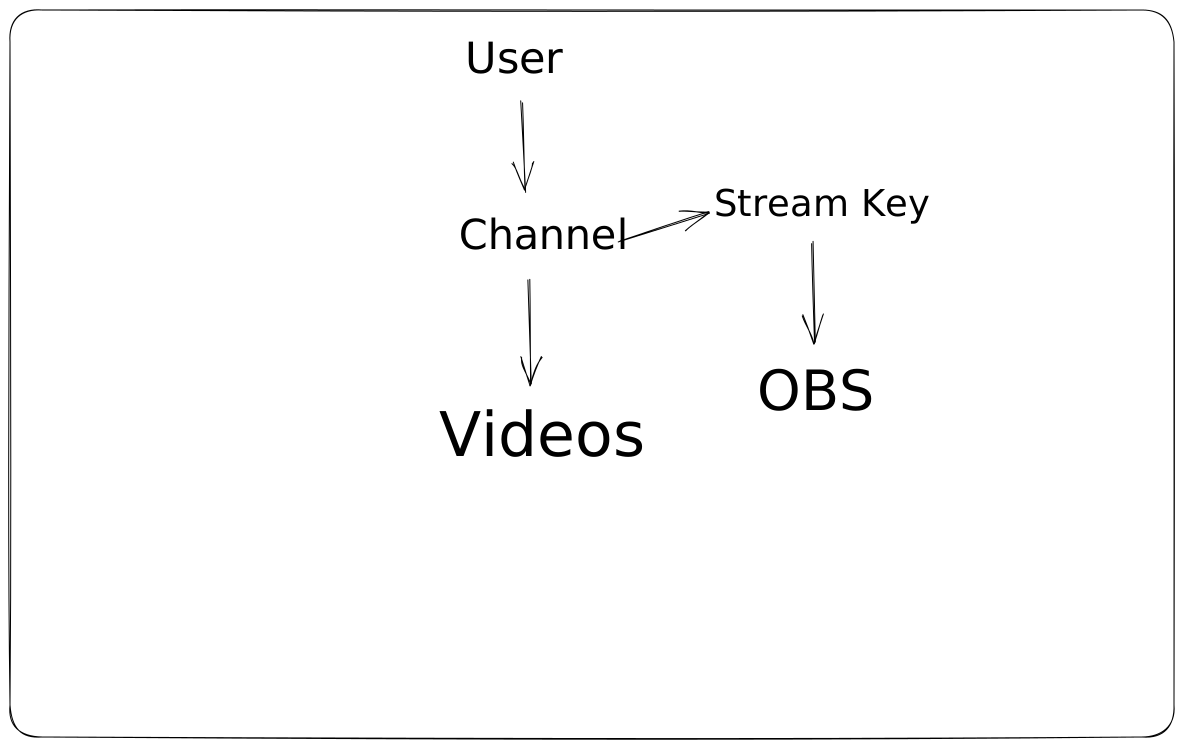
By default a user doesn’t make a channel, They need to create it which can be done from sending a post request to user/channel/videos>. As response streamKey with other channel information is also sent. This part is curtail and important
cause stream key is necessary for streaming to your channel and they must to kept as a secret.
Note
If other users get access to your stream key, they can easily stream from your account. You MUST keep it a SECRET.
After they stream key is generated now users needs a video. At least one video on the channel is compulsory for title and thumbnail generation.
We can create a video by sending a post request to /user/channel/videos/. After the video is created you get url on the response. This url is the new
file name generated and is also used to access the stream.
Now that everything is set the user can setup OBS and start streaming. Once they hit start streaming the stream is sent to the RTMP service on
rtmp://localhost:1935/streaming. After this request is successful the service now sends a http request to the RestAPI to get the stream name to save
the stream with the appropriate file name. The same request also authenticates the user with the stream key. If the RestAPI dose not find the stream key in the
database then the stream is closed by the rtmp service. This happens only when the stream key is not found and the server send 400 as response and rtmp service
stops the stream.
Note
Also if the user has not made a new video then a new video is created with the same title and thumbnail in the database.
Once all of this is complete the stream is sent to FFMPEG which then converts the stream to multiple bitrate hls videos.
Now to access these hls videos we all we need is a hls library for running it on the browser. THese streams are served on http://localhost:8080/hls-live/your_video_url.m3u8
. Note that the video url which was returned at first must be used in place of your_video_url.m3u8.